What's Mudae
Mudae is a time-gated collection (gacha) Discord bot.
note
You can see the official Mudae Wiki for much more detailed information.
How is it time-gated
You get a set number of rolls every hour. When rolling, you get a set amount of claims per window of 3 hours.
rolls: One roll is the action of getting a random character card.
claims: From any roll, claiming the character into your collection. You can claim from any rolls, even from other players.
important
Only one player can claim a characters!

Why claiming characters
The first answer is pretty simple: to grow your collection, or get your favorite characters.
The more complex one comes from the in-game points: kakeras
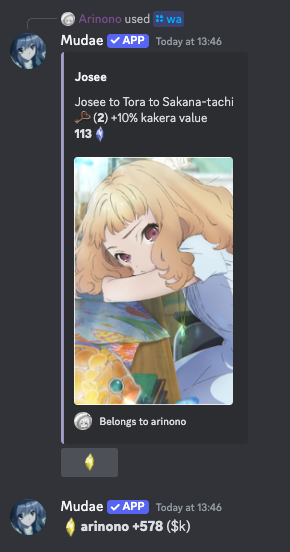
When someone rolls a character that is already claimed, the claim reaction button will be replaced with a kakera reaction button.
Rolls
There are difference groups of characters you can roll for. Here are a few examples:
- Women in animes:
wa - Women in games:
wg - All women:
wx - Men in animes:
ha - Men in games:
hg - All men:
hx
Commands
wa means that you can roll for this group using either:
- a message
$wa - the commands
/wa
You can find more info in commands
Getting started
Before doing anything, some settings
You can run these commands to setup your experience:
$limroul 1 1 1 1(see limroul)$ta claim rt rolls jump kakerapower kakerareact kakerastock jump vote dk rollsreset pokemon(see commands)$persrare 1: increases the chance to roll a character that is already claimed.
Common commands
tip
All commands have a / command alternative, but are usually more annoying to use.
The only / commands that are recommended to use are the roll ones (e.g. /wa)
because there are slight bonuses on them (wish luck, ...)
Rolls
There are difference groups of characters you can roll for. Here are a few examples:
- Women in animes:
wa - Women in games:
wg - All women:
wx - Men in animes:
ha - Men in games:
hg - All men:
hx
There are also a few other commands related to rolls:
$usis a one time usable roll obtained through loots$rtis a reset of the claim timer$getfcand$fcis a one time reset of the claim timer. Usually as a reward during global events, or compensation during outages.
Timers
$tu: gives out all the timers configured with$ta(that we ran above). You can change this by reading$tawithout parameters.$mu: Timer for ability to claim$ru: Timer for ability to roll$ku: Timer for ability to react to kakeras$rtu: Timer for ability to use$rt(see rolls)$fcu: Gives you the number of$fcyou have left
Wish list
$wl: see your wish list$wishadd: add to your wishlist$wr/$wishremove: remove from your wishlist$starwish: set a wish as a starwish (run$s starwishfor more info)
Characters
$mm: See your collection$top: See the top characters on the server$im: Look for characters
tip
All the commands involving lists of characters can be used with flags.
These flags tweak the result of the listing. For example $mmk will list your
characters with their kakera value.
Read more with $s flags
Upgrades
$badges: Badges$kt: Kakera towers$lk: Your obtained kakera loots bonuses$kl: Roll kakera loots
Players
$tsk: Server leader board by kakera$tsv: Server leader board by collection value
Settings
$persrare: sets the level of already claimed characters you'll see$limroul: sets your personal limroul$wishdm: set the privacy of your wishlist$ta: configures your$tulayout
Characters
The whole purpose of the game is to gather characters in your collection.
As everyone does so, their value will change and increase (we will see this later in the kakera section).
Among the upgrades you can buy as you level up in the game, wish list slots will one of them.
Wish list
You can put characters in you wish list for a greater chance of rolling these characters (among other bonuses later).
You can see your wish list with $wl and see all the commands related to wishlists
with $s wishlist (search wishlist).
limroul
As part of the other bonuses, $limroul is one of them.
It reduces the pool of characters you can roll from.
note
There are tens of thousands of characters all categories combined.
The lowest limroul setting without upgrades is 7000 7000 4000 4000.
Meaning, you can roll:
- 7K anime women
- 7K anime men
- 4K game women
- 4K anime men
tip
An easy way to set the lowest limroul without knowing what are your bonuses is
$limroul 1 1 1 1
Keys
Once you have claimed a character, the next time someone rolls them, any one will be able to react to the card again to get kakeras.
Another bonus of rolling an already claimed character, that is only for the owner of the card is keys.
An excerpt of the command $moreinfokeys says:
Rewards:
(All of the following rewards are bound to the character reaching the corresponding key level and are not reset if you divorce or trade the character)
- LVL 1 (Bronze) => $embedcolor command unlocked to customize the embed color.
- LVL 2 => +10% kakera value.
- LVL 3 (Silver) => Teal and green kakera spawning on this character are replaced by orange kakera.
- LVL 4 & 5 => +10% kakera value.
- LVL 6 (Gold) => When you roll this character, you earn its kakera value (4500 max/3h, $bku)
- LVL 7, 8 & 9 => +10% kakera value.
- LVL 10 (Chaos) => Kakera reactions on this character cost half the power for the character owner.
note
You get one key each time you roll one of your characters again.
There are later bonuses, in towers that can increase the chance to get 2 at once.
Kakera
What are kakeras
Kakeras are the point system in Mudae.
They are used for purchasing upgrades in the game to either:
- generate more kakeras
- improve the chances of rolling characters you want
How to get kakera
Divorce
The easiest way (but not necessarily the most efficient) is to divorce a character you own.
By running the command $divorce <character-name>, you'll receive the character value
in kakeras.
Reaction
As said in the getting started:
When someone rolls a character that is already claimed, the claim reaction button will be replaced with a kakera reaction button.
Reaction power
Reacting to a kakera from an already claimed character requires power.
You can see your power, or power cost per reaction by using $ku.
Kakera colors
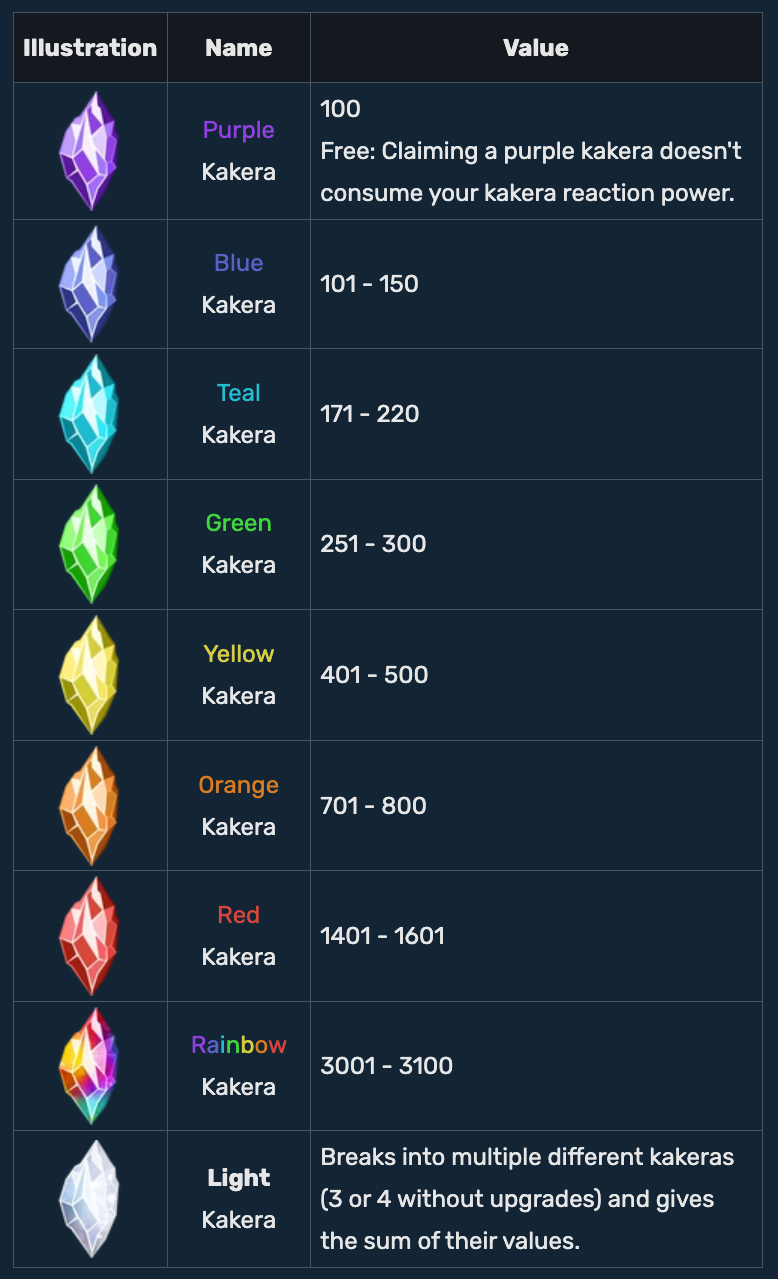
Each kakera has a color and each color corresponds to the value you'll receive when
reacting.
You can see the details below (but this can change depending on upgrades):
What upgrades can I purchase
You can buy 3 kinds of upgrades, in order from easiest to hardest (or from early to late game):
Kakera Badges
There are 6 badges that you can buy and upgrade in Mudae. Each giving a different bonus for each level, and a final bonus once maxed.
important
With the specific seasonal rules on Le Studio, there is a high chance to be able to buy all the badges all at once.
Read down below for the optimal badges buy order.
All badges
tip
For more info about badges, you can read the official documentation.
or by running $kakerarewards
- Bronze:
- Levels: give out more wishslots (see wishlist)
- Maxed: When claiming a wished character, receive 500 kakera
- Silver:
- Levels: give out a chance to roll a wished character
- Maxed: When someone else claims one of your wishes, receive 200 kakera
- Gold:
- Levels: Reduction in power cost when reacting to kakeras
- Gold: Restores power when using
$dailykakera(or$dk) (see commands)
note
These following badges have requirements to unlock, you can run $kakerarewards to see them
- Sapphire:
- Levels: Get one more rolls every hour
- Maxed: Replaces blue by yellow kakera (remember values)
- Ruby:
- Levels: Each level gives out a different rewards from the 3 base badges (wishslot, wish chance, react power)
- Maxed: All badges are 25% cheaper. See down below for the optimal badges buy order.
- Emerald:
- Levels: Unlocks the
$rtcommand, see commands - Maxed: When claiming a character, immediately receive their value in kakera
- Levels: Unlocks the
Optimal badge buy order
At first, there is a better order to get your badges, for example: Gold, then bronze, then sapphire, ...
But let's not talk about this. This first way relies on you upgrading badges as you play,
then reset everything with $kakerarefund @username.
But in Le Studio, after each seasonal reset, we redistribute all kakeras accumulated to players (and keep some on the side if anyone joins during a season). There should be enough for you to buy all the badges all at once (roughly costing 50K kakera).
So you can just follow this order:
- Bronze 2:
$bronze 2 - Silver 2:
$silver 2 - Gold 2:
$gold 2(all this unlocks the ruby badges) - Ruby 4:
$ruby 4(this unlocks the 25% discount on all other badges, so now buy everything) - Sapphire 4:
$sapphire 4 - Emerald 4:
$emerald 4 - Bronze 4:
$bronze 4 - Silver 4:
$silver 4 - Gold 4:
$gold 4
Towers
Once you unlocked and upgrades all your badges, it's time to work on the towers.
Each tower is made of 12 floors, each floor giving a bonus:
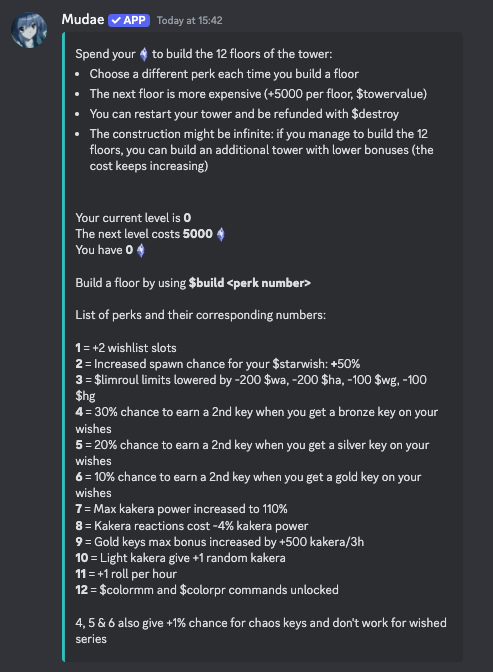
Each floor costs 5K more kakera to buy, for example:
- 1st floor costs 5k
- 2nd floor costs 10k
- 3rd floor costs 15k
- ...
Once you fully built a tower (all 12 floors), you can build another one. The bonuses will remain roughly the same, but of lower value.
At some point, some bonuses will disappear as they are maxed.
Kakera Loots
Kakera Loots are the most random way of getting upgrades. Another gacha in the gacha.

Quality and Quantity
In the graph above, you see the 3rd column mentioning Quantity. For kakera loots, there are 2 ways of getting better or more loots: quantity and quality.
Buying quality and quantity upgrades are pretty much a must have to start using kakera loots. There are a hundred levels for each bonus (100 for quantity and 100 for quality).
The first level costs 2K, then from there, each level costs the price of the previous one + 200 kakera.
note
The total amount of kakera needed to buy both Quantity 100 and Quality 100 is 2.380M kakeras, or roughly 31 tower floors.
tip
Knowing this, a good way to know when to start investing in kakera loots, is the number of tower (floors).
Once you hit 3 fully built towers, you can $destroy them to receive their value.
Then upgrade Quantity and Quality to max, buy back some of the 1st floors of the tower
as they are of great value. Lastly put the rest in kakera loots with $kl.
After this, the game is pretty much juggling between building towers and doing kakera loots.
A good kakera loot rewards to focus on early is the $rt cooldown reduction. (see commands)
Pokemon
There is also a gatcha for Pokemons, a much simpler one.
You can roll for pokemons once every 2 hours with $p.
You can see your pokedex with $pd ($pokedex), and some sorting orders,
such as $pd rare by rarity, or $pd abc.
You can release pokemons with $release, but is pretty much not recommended.
There is no trading or point system in this game.
So the only useful release commands are $arl ($autorelease) to automatically
release pokemons you have doubles of.
There is also $arl 4 to auto release pokemons of rarity value of 4, since they
are not automatically released by $arl.
Manual release is only required for Legendaries, Ultra Beasts and shinies.
Speaking of shinies, you can use $shinyhunt to increase the shiny luck through
a shiny chain.